Creating a Block Booking wihin the Calendar view
In this article we will cover how to create a block booking within the calendar view from the view of an administrator.
1. We can create a new block booking by hovering over the court and time and right clicking which will bring a drop menu of:
- Create Fixture
- Create Booking
- Create Block Booking
2. Opting for the "Create Block Booking" option allows you to select the venue, playing area, and booking type.
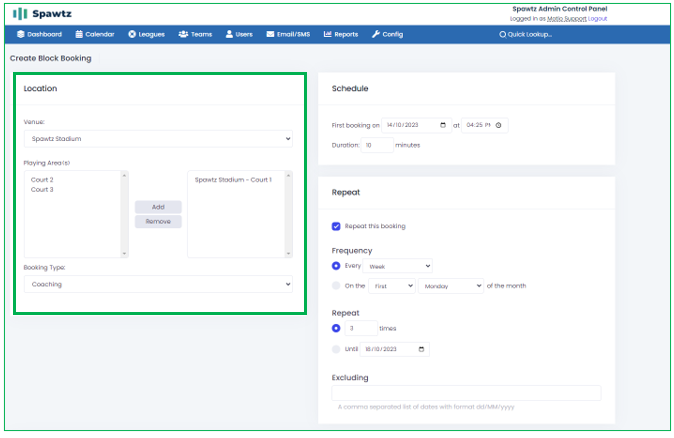
3. You will then configure the booking schedule, specifying the start time, duration, and recurrence pattern. You can choose to have the booking repeat daily, weekly, fortnightly, or monthly. You can also set specific days for repetition. You can also define the recurrence limit using the calendar or exclude certain dates, like public holidays or shutdown periods.

4. The cost of each booking in the block can be adjusted according to the venue's needs, with options for flat rates or variable pricing during peak and off-peak periods.
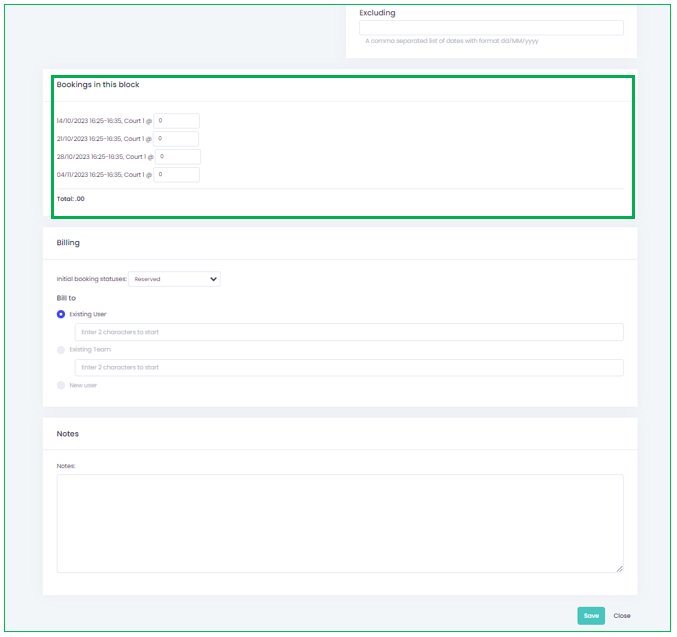
5. In the billing section, you can configure the billing schedule and how it appears on team or user statements. Make sure to enter any relevant notes and click "Save" once all details are confirmed.